UGC Portfolio Examples and a Beginner Template
A UGC portfolio should show what you create, give buyers a way to view your work, and make it easy to contact you. Start with a clear service statement, a few complementary samples, short captions explaining your role, and one working contact method.
The three examples below are storyboards and scripts for a notebook demonstration, an on-camera explanation, and a fictional task-board walkthrough. They are practice concepts, not finished videos or client work. Use them to plan how you present your own samples.
Templates to use with this guide
- Editable UGC portfolio builder — HTML
Open the downloaded file in a browser, fill in your details and three sample links, preview, and save a standalone portfolio HTML. The builder sends no data to a server and does not publish the page.
- Portfolio sections and asset record — TXT
Copyable text for each section, a blank asset/permission record, and a pre-sharing checklist. Use it in your preferred document or website tool.
- Three concept scripts and shot lists — TXT
Full scripts, caption text, shot directions, and honest portfolio captions for the three concepts shown here.
See the complete concept portfolio
Open the preview to see how the samples, service statement, introduction, and contact section fit on one page. It is a teaching example, so its contact section explains what to include instead of listing a creator for hire. The editable builder lets you add your own details and sample links.
Make the service and samples easy to find. Keep labels such as “concept storyboard” beside each piece so a buyer understands what they are viewing.
Include enough context to judge the work
Only include client logos or testimonials when you have genuine relationships and permission to show them. If you currently offer planning and scripting, show that work clearly. If you offer video production, link to a finished video that demonstrates it.
| Portfolio element | What a buyer should learn | Example wording |
|---|---|---|
| Service statement | What you make and for whom. | “Product demonstrations and task walkthroughs for everyday desk tools.” |
| Selected work | What the sample contains and which skills it shows. | “Unpaid concept storyboard: overhead notebook demonstration.” |
| Context caption | Audience, viewer task, contribution, and limits. | “I wrote and illustrated this sequence as a practice storyboard.” |
| Services | Which deliverables you can reliably supply now. | List actual formats and responsibilities, not every service a future business might offer. |
| Introduction | Relevant experience or approach using accurate details. | Explain how you plan, make, and review the work; use true facts about yourself. |
| Contact | A direct way to discuss a suitable brief. | A monitored professional email or working contact route. |
| Usage note | Whether shown work is conceptual or permitted client work. | State the sample’s status; confirm rights and project-specific terms separately. |
Example 1: a hands-only product demonstration
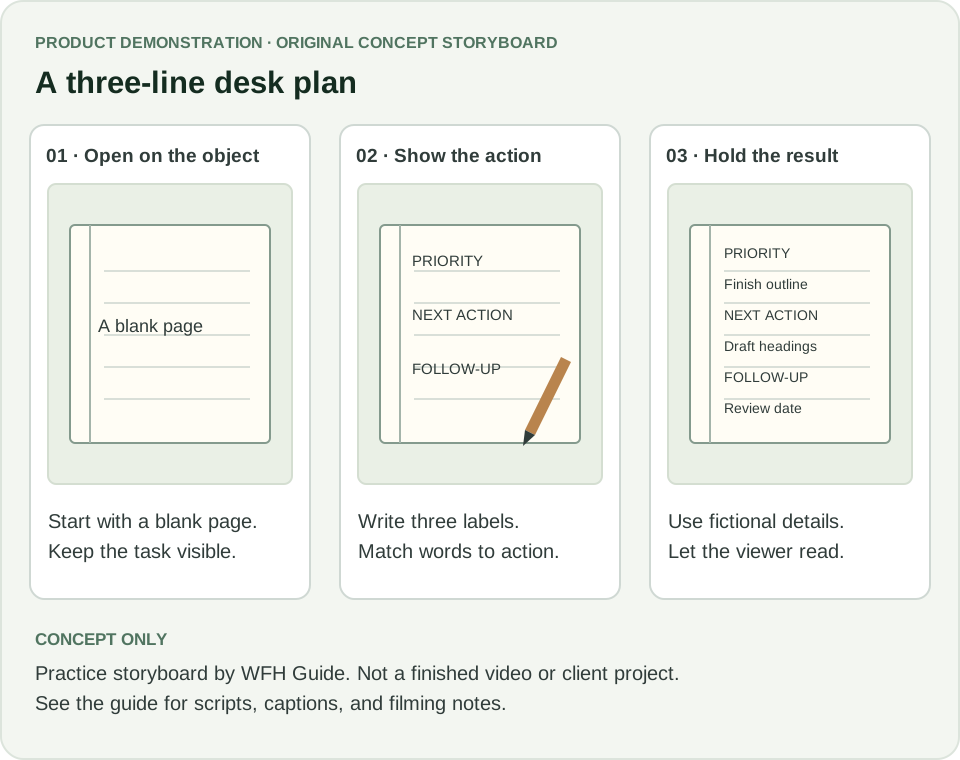
The notebook example shows a desk worker how to write a priority, next action, and follow-up. It gives a buyer a sequence to review: introduce the problem, show the action, then hold on the completed page.
- Skill visible in this exampleThe words and shots support the same task, and the final shot gives the viewer time to read the completed page.
- What to add when you film itUse a steady overhead shot, focus on the writing, record clear narration, and leave enough time to read the captions. The finished video will demonstrate skills the storyboard alone cannot show.
| Storyboard beat | Script / caption text | What the decision shows |
|---|---|---|
| Open: blank page | “Opening your laptop with too many loose tasks? Start with three lines.” | The opening names a recognizable situation and immediately shows the object. |
| Demonstrate: labels appear | “Write one priority, its next action, and anything you need to follow up.” | Writing close-ups match the narration; the viewer can copy the structure. |
| Explain: filled page | “For this example: finish the outline, draft three headings, and confirm the review date.” | Fictional content demonstrates use without exposing private work. |
| Close: hold the page | “Try the layout on a page you already have.” | The next step fits an unpaid educational concept; there is no invented sales offer. |
Sample portfolio caption
Unpaid concept storyboard — notebook demonstration.
Audience and task: help a desk worker understand a three-line paper plan.
Contribution: original brief, script, shot sequence, and illustrations.
Status: practice storyboard and script; not filmed or commissioned.
Example 2: an on-camera explanation
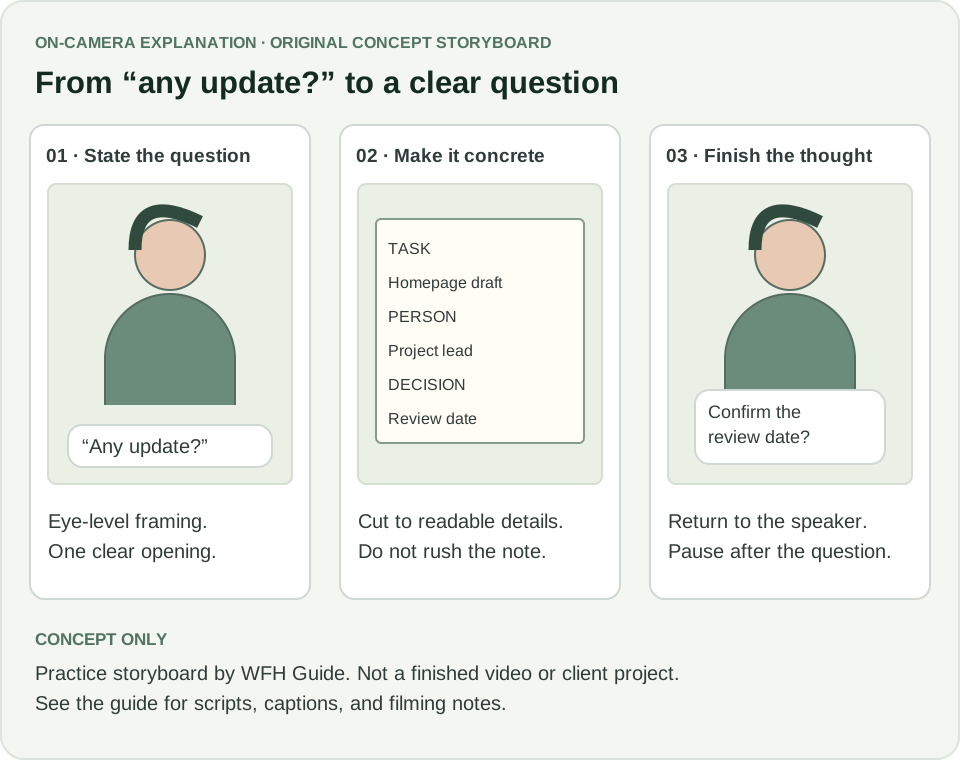
The second concept explains what to note before asking someone for an update. A presenter introduces the question, then a close-up makes the advice concrete. When filming your own version, use a natural speaking pace and cut to the note as each field is named.
- Skill visible in this exampleThe cutaway makes an abstract explanation concrete, and the finished question follows the three fields.
- What to show in a recorded versionUse your own delivery or a consenting performer, readable captions, and a clear voice. A drawing cannot establish on-camera confidence or audio quality.
| Storyboard beat | Script / caption text | Filming notes |
|---|---|---|
| 0–7 seconds: presenter | “Before you send ‘any update?’, put three details in your note.” | Frame the presenter at eye level and introduce the task in the first sentence. |
| 7–21 seconds: note close-up | “Name the task, the person who can help, and the decision you need. For example: homepage draft, project lead, confirm the review date.” | Cut to a fictional note with TASK / PERSON / DECISION. Keep text visible through the relevant narration. |
| 21–30 seconds: presenter and note | “Now your question can be specific: can you confirm when the homepage draft is ready for review?” | Return to the presenter for a natural finish. Leave a short pause after the question. |
Sample portfolio caption
Unpaid concept storyboard — a specific follow-up question.
Audience and task: help a new remote teammate turn a vague request into a clear question.
Contribution: original explanation, script, cutaway plan, and presenter illustration.
Status: practice storyboard with an illustrated presenter; not filmed or commissioned.
Example 3: a voiceover walkthrough
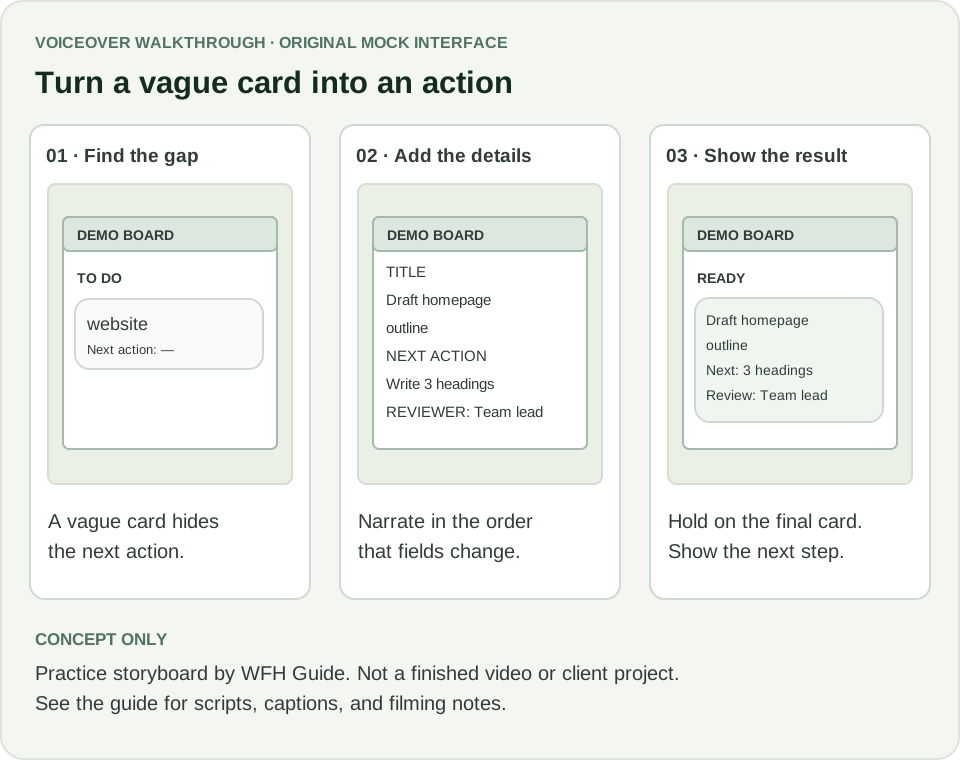
This example uses a fictional task board to turn a vague card into an actionable item. It shows how narration, cursor actions, and on-screen text can work together. For a real software sample, use an authorized demo account and verify each step in that product.
- Skill visible in this exampleThe narration describes observable changes, the interface is intentionally simple, and the closing screen confirms the result.
- What changes for a real software briefVerify every feature, obtain the relevant permission, use a clean demo environment, and remove private names and notifications. Replace fictional interface details with the actual approved flow.
| Storyboard beat | Script / caption text | Filming notes |
|---|---|---|
| 0–7 seconds: open the vague card | “This card says ‘website’, but it does not tell a teammate what to do next.” | Use a fictional demo board; frame the card so the problem can be read. |
| 7–21 seconds: fill two fields | “Rename it ‘Draft the homepage outline’. Add the next action: write three section headings. Then name who should review it.” | Show each field change in the same order as the narration; do not race the cursor. |
| 21–30 seconds: show the Ready column | “Move the card to Ready when those details are set. Now the task has a concrete starting point.” | Hold on the completed card. In a real product, verify the exact workflow and use an authorized demo account. |
Sample portfolio caption
Unpaid concept storyboard — task-board walkthrough.
Audience and task: show a new team member how to make a vague card actionable.
Contribution: original mock interface, voiceover script, sequence, and annotations.
Status: practice storyboard using a fictional interface; not a screen recording or software endorsement.
Label samples and confirm permission to share them
Use a label that fits each piece: “concept storyboard,” “unpaid filmed practice sample,” or “client work shown with permission.” Explain your contribution separately from any campaign results. If you have permission to share measured results, include the source, period, and what you did; otherwise, focus on the work itself.
You can adapt these WFH Guide drawings and scripts for practice. Credit the source and explain what you changed. For other assets, keep a record of the owner, license, permitted uses, and any required attribution. The download includes a blank record for this.
A practice label does not clear copyright or privacy rights. The US Copyright Office explains that original photographs can be protected from creation, and YouTube advises getting permission before recording people or posting their personal information. Check the requirements for the assets and destination you use.
Customize the editable portfolio template
- 1Open the HTML builder.Download it and open the file in your browser, or use the preview link above. The form runs locally in the page; it does not create an account or publish a site.
- 2Write your service statement and introduction.State your real service, audience, and contribution. Replace broad claims such as “I make viral videos” with something a sample can demonstrate.
- 3Add three sample links and captions.Add HTTPS links to your own hosted media or pages. For each piece, name the format, audience, your role, and whether it is practice or client work. The builder links to your samples; it does not upload or host videos.
- 4Add a real contact address.Use an address you monitor and are comfortable sharing. The template creates an email link after you fill in the contact field.
- 5Preview, then save the finished HTML.Review each sample and save a standalone copy. The saved page contains your text and links; the editor form is removed. Download again after changes because edits are not automatically saved.
- 6Share through a host or document workflow you control.A local file is not a public website. Upload the saved HTML to a hosting service you already use, or move the plain-text version into your preferred tool. Check that tool’s current sharing settings before distributing a link.
Test the portfolio as a visitor would
- Open it without your account.Use a signed-out browser to check every sample. A link that works only for the owner is not a usable portfolio sample.
- Check a narrow screen.Read every caption, tap sample links, and inspect the actual hosted media on a phone. Keep important text out of video-player overlays.
- Test playback and accessibility.For finished videos, verify play and pause, audio, captions, and a transcript or equivalent text. For storyboards, provide readable script text alongside the drawings.
- Test contact access.Check that the email link contains the correct address; also leave the address readable for visitors who do not use a default mail application.
- Review file size and maintenance.Avoid automatically loading large video files. Use a descriptive link or appropriate preview, remove broken links, and update sample status as work develops.
- Keep private records private.Store permissions, invoices, internal feedback, and client details separately from the public portfolio. The blank asset record is a personal working file, not a page to publish.
Frequently asked questions
What should a UGC portfolio include with no experience?
Show clearly labeled practice work, your actual role, a narrow service statement, useful context, and a contact method. A concept storyboard is valid evidence of planning, but do not present it as a finished video or paid campaign.
How many examples should a UGC portfolio have?
Use enough complementary samples to show the service you offer. This template has room for three, but that is a starting point, not an industry requirement. Remove weaker or repetitive work rather than filling a quota.
Is the portfolio template free to edit?
The HTML builder and plain-text starter on this page are available without a signup. You can customize them for your own portfolio. They do not host videos, publish a website, or give permission to reuse third-party work.
Are these real client portfolio examples?
No. These are practice storyboards and scripts created for this guide. To show that you can deliver video production, add finished recordings you made yourself.
Sources and further reading
Keep learning
Start your first UGC service
Turn a clear brief into a sample, pitch, and project scope.
Read guide →Choose between creator roles
Separate content production from audience distribution and endorsement.
Read guide →Build a portfolio with no experience
Use honest evidence of transferable skills beyond UGC.
Read guide →